Imagine sitting at your desk at 11:00 PM with a 40-page research paper on one screen and a blank document on the other. Your exam is in two days, your notes look like a random collection of broken thoughts, and the pressure is mounting. We have all been there.
A student preparing for exams may spend hours simply organizing notes and trying to find credible sources. This leaves almost no time for actual revision or understanding the concepts.
The strategy has changed. Students are no longer just using search engines to find long lists of links. They are turning to specialized apps to build study schedules, solve multi-step equations, and break down complex subjects into plain English.
Finding software that actually works without demanding a premium monthly subscription can be a massive headache. Many platforms advertise themselves as completely free, only to lock their best features behind a paywall after you click three buttons. This guide cuts through the noise to highlight the exact applications that will help you study more effectively without spending a single rupee.
Table of Contents
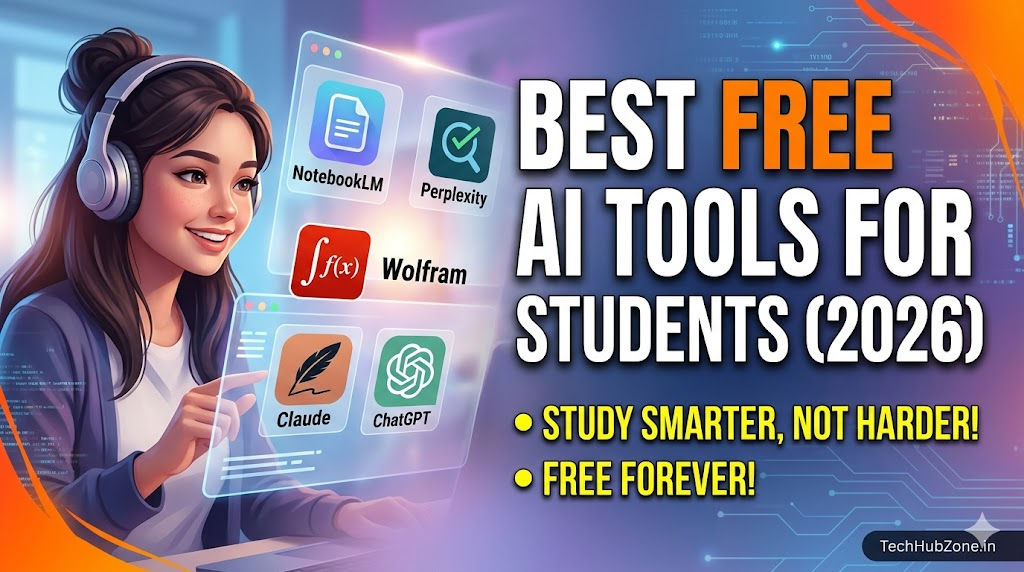
Quick Summary: Top Student AI Stack for 2026
| Best For | Recommended Tool | Cost | Complexity | Core Advantage |
| Document Analysis | NotebookLM | 100% Free | Easy | Turns PDFs and lecture slides into a personalized interactive study guide. |
| All-Purpose Study | ChatGPT | Free Tier Included | Very Easy | Exceptional for brainstorming ideas, planning essay outlines, and coding. |
| Research & Citations | Perplexity AI | Free Tier Included | Easy | Provides factual answers with accurate, clickable source citations. |
| Math & STEM Problems | Wolfram Alpha | Free Tier Included | Medium | Uses computational data instead of word prediction to solve exact mathematical equations. |
| Writing & Refining | Claude | Free Tier Included | Easy | Generates highly natural, articulate essay feedback and text summaries. |
What Are Student AI Tools and Why Use Them?
An educational AI assistant is not an “answer machine” meant to do your homework while you check out. Think of it as a highly patient, 24/7 personal tutor sitting right next to you. These applications run on large language models and computational data systems that can read text, solve math problems, write code, and organize schedules instantly.
Students use these platforms because standard search engines often return outdated links, ad-heavy blogs, or generic textbook entries. When you are stuck on a difficult concept, you do not need more reading material—you need that specific material explained differently.
Core Features to Look For:
- Contextual Explanations: The ability to explain a concept like you are a 10-year-old, a high schooler, or a college senior.
- Document Processing: Uploading long PDFs, textbooks, or syllabus sheets to ask specific questions about them.
- Fact Verification: Providing accurate references so you do not get flagged by your professor for making up sources.
The Deep Dive: Deep Breakdown of the Best Free Tools
1. NotebookLM (Your Dedicated Study Hub)
NotebookLM by Google has quietly become an indispensable application for students managing dense reading loads. Unlike general chatbots that pull information from the open internet, NotebookLM focuses exclusively on the files you upload.
[Insert Dashboard Screenshot Here]
How It Works:
You upload your lecture slides, syllabus, or PDF textbooks directly into a private notebook. The system reads everything and instantly creates a detailed summary, an interactive study guide, and a list of key terms. You can then ask questions, and it will answer using only your uploaded files, showing you exactly which page the information came from.
Practical Use Case:
A medical or law student facing hundreds of pages of case studies or anatomical terms can upload all their readings for the week. Instead of scrolling back and forth through a massive PDF, they can type, “Give me a bulleted checklist of every symptom mentioned for cardiovascular diseases in these documents,” and get an instant, completely accurate answer.
- Strengths: Zero fluff, no source fabrications (hallucinations), and it creates incredibly realistic “Audio Overviews” that turn your text notes into a two-person podcast discussion.
- Limitations: It cannot browse the live web for general information, and it is limited to the documents you manually feed into it.
2. Perplexity AI (The Research Specialist)
If you have ever asked a standard chatbot for a factual reference, you might have noticed it sometimes invents realistic-looking essay citations that do not actually exist. This is a fast track to failing an assignment. Perplexity AI fixes this completely.
[Insert Feature Screenshot Here]
How It Works:
Perplexity acts as a hybrid between a search engine and an AI assistant. When you type a research question, it scans the live web, cross-references credible publications, and builds a comprehensive, structured response. Every single claim it makes features a tiny, clickable footnote number leading directly to the source website.
Practical Use Case:
When writing a history or political science paper on the economic impacts of a specific policy, typing your prompt into Perplexity will give you a breakdown of the numbers along with direct links to academic journals, newspapers, and institutional reports.
- Strengths: Excellent for avoiding academic integrity issues. Its “Academic Mode” specifically filters out generic blogs to target peer-reviewed papers.
- Limitations: The free version limits how many deep-search queries you can run every few hours before reverting to standard search speeds.
3. Wolfram Alpha (The Unbeatable STEM Assistant)
Standard language models are notoriously bad at math. Because they predict the next most likely word or number rather than actually calculating anything, they can easily state that $15 \times 14 = 220$ with complete confidence. Wolfram Alpha does not guess. It computes.
How It Works:
Refined over decades, Wolfram Alpha uses a massive structured knowledge base and mathematical algorithms. When you enter a calculus problem, a chemical formula, or a physics equation, it breaks down the query mathematically.
Practical Use Case:
An engineering student struggling with a complex derivative can enter the equation into Wolfram Alpha. The system will map out the correct answer and graph the function visually.
- Strengths: Unmatched mathematical and scientific accuracy. It is completely reliable for quantitative data.
- Limitations: The free tier provides the final answer and charts, but locks the step-by-step manual solution behind their premium tier. It is designed to solve problems, not to teach the foundational concepts from scratch.
4. Claude by Anthropic (The Writing & Analysis Partner)
When it comes to understanding nuance, editing prose, or analyzing literature, Claude (running on the Sonnet model) outperforms almost every other free tool on the market. It writes with a remarkably natural, human-like cadence.
[Insert Results Screenshot Here]
How It Works:
You paste your written essays or open-ended prompts into the dashboard. Claude evaluates the structural flow, identifies logical gaps, and suggests stylistic improvements without completely rewriting your voice.
Practical Use Case:
Imagine you have just drafted a 1,500-word literature review on Shakespearean plays. You can paste it into Claude with the prompt: “Act as an objective editor. Point out where my arguments lack evidence and show me where my transitions feel forced.”
- Strengths: Exceptional grasp of language, tone, and editorial logic. It is ideal for breaking down philosophy, poetry, or historical arguments.
- Limitations: The free tier has a restrictive message limit that fluctuates based on overall network traffic. If you are using it heavily during peak final exam weeks, you might hit a wall mid-session.
5. ChatGPT by OpenAI (The Ultimate Brainstorming Partner)
ChatGPT remains the most flexible, widely adopted general-purpose tool. While others specialize in math or citations, ChatGPT excels at helping you get unstuck when staring at a blank page.
How It Works:
Using its broad conversational memory, ChatGPT can handle coding bugs, generate layout outlines, format tables, and build personalized daily calendars based on your current workload.
Practical Use Case:
A computer science student writing a Python script might hit a frustrating “syntax error” they cannot locate. Pasting the code block into ChatGPT with a request to spot the error usually yields a corrected version and an explanation of the mistake within three seconds.
- Strengths: Huge free feature set including basic data analysis, image generation inputs, and an incredibly fast, responsive mobile app for on-the-go studying.
- Limitations: Its conversational free tier drops to a less capable engine after you send a series of complex prompts within a short time frame.
Step-by-Step Guide: Building Your Perfect Free Study System
You do not need to choose just one application. The smartest approach is to build an interconnected loop where each tool handles what it does best. Here is how to set up an efficient workflow for a major academic project.
1.Gather Data and Fact-Check:Phase 1: Research.
Open Perplexity AI and run your initial queries to discover core facts, historical dates, or relevant studies. Save the high-quality source links it generates.
2.Organize Your Materials:Phase 2: Deep Reading.
Download the full articles or lecture slides from your syllabus and drop them into NotebookLM. Use this space to generate customized summaries and ask specific questions without worrying about fake data.
3.Outline and Structure:Phase 3: Planning.
Take your core notes over to ChatGPT to map out the structure of your presentation or paper. Ask it to build a logical, section-by-section outline.
4.Draft and Refine Your Text:Phase 4: Writing.
Write your draft using your own voice. Once finished, paste the text into Claude to check for tone consistency, clear up confusing phrasing, and polish the final flow.
Comparison: Feature Analysis for Students
This tool comparison focuses on the core daily tasks you will encounter throughout the academic semester.
| Application | Document Upload Limit | Best Academic Field | Mobile App Availability? | Requires Account Creation? |
| NotebookLM | Very High (Up to 500k words per source) | Humanities, History, Medicine, Law | Web-optimized only | Yes (Google Account) |
| Perplexity AI | Moderate on Free Tier | Journalism, Social Sciences, Research | Yes (Android & iOS) | Optional for basic searches |
| Wolfram Alpha | Low (Text inputs preferred) | Mathematics, Physics, Chemistry, Data | Yes (Android & iOS) | No for basic answers |
| Claude | Moderate | Literature, Philosophy, Creative Writing | Yes (Android & iOS) | Yes |
| ChatGPT | Moderate on Free Tier | Computer Science, Business, General Studies | Yes (Android & iOS) | Yes |
Common Mistakes Students Make with Academic AI
While these platforms can drastically reduce your stress levels, using them incorrectly can easily hurt your grades or land you in hot water with your department.
- Treating Text Generators as Fact Engines: Never assume a standard conversational model is telling the truth about dates, historical events, or quotes. Always verify critical facts through a dedicated search engine or a tool like Perplexity.
- Copying and Pasting Entire Essays: Professors are highly attuned to the flat, repetitive structure of unedited generated text. If your essay uses words like “furthermore,” “moreover,” “it is crucial to remember,” or phrases that sound overly clinical, it raises immediate red flags. Use these platforms for ideas, editing, and structure—but write the actual sentences yourself.
- Ignoring the Math Limit: Blindly pasting a statistics assignment into a standard text chatbot without validating the mathematical logic through a dedicated computational system will almost always lead to flawed calculations.
Frequently Asked Questions (FAQs)
Are these tools completely free to use for students?
Yes. Every option featured in this guide provides a highly capable free tier that does not require a credit card. While they all offer paid monthly premium upgrades, the free versions are more than enough to handle standard daily school or college assignments.
Will using these platforms show up on plagiarism checkers?
If you copy text word-for-word from a standard chatbot and paste it into an assignment submission portal, modern detection systems (like Turnitin) can flag the predictable text patterns. However, using these applications to brainstorm outlines, summarize readings, or get editing feedback on your own writing will not trigger plagiarism issues.
Which free tool is best for solving tough calculus equations?
Wolfram Alpha is the absolute best option. It processes equations algorithmically rather than predicting language, ensuring that the final output is mathematically sound.
Can I upload entire PDF textbooks to analyze them for free?
Yes. Google’s NotebookLM allows you to upload multiple large documents (up to 500,000 words per source file) completely free of charge, making it the most powerful reading assistant available right now.
Is there a free option that helps with programming and debugging code?
ChatGPT excels at handling code structure. It quickly identifies missing syntax, explains broken logic loops, and translates code snippets between different languages like Python, Java, and C++.
Why do some chatbots make up fake references?
Standard models work by predicting what words should logically follow each other based on broad web patterns. If you ask for a specific source, the system often designs a citation format that looks incredibly real, combining actual journal names with fabricated dates or author names.
Do I need a professional university email (.edu) to access these free accounts?
No. Standard personal accounts (like a regular Gmail) work perfectly fine for all the free tiers listed here.
How can I use these programs safely without sharing my private data?
Avoid pasting highly sensitive personal details, identification numbers, or private institutional data into any public interface. Most platforms use general user interactions to train future updates unless you explicitly turn off history sharing in your account settings dashboard.
Can Claude write an entire research paper for me?
While it has the technical capability to output long strings of text, letting it write your paper completely defeats the purpose of learning, violates academic integrity rules, and usually results in a generic, shallow essay that lacks original insight.
Why does my chatbot account suddenly tell me I have reached my hourly limit?
To keep their servers running smoothly during peak usage hours, companies place data restrictions on free accounts. If you hit a message wall on one tool, you can simply pivot to an alternative application like switching from ChatGPT to Claude to finish your session.
Final Strategy: How to Choose Your Tool
Determining which application to open depends heavily on what your screen looks like right now:
- If you are looking at a dense stack of PDFs, lab reports, or long lecture notes that you need to master before tomorrow morning, go straight to NotebookLM. It keeps your focus locked entirely onto your materials without distracting you with irrelevant web data.
- If you are staring at a blank document and have absolutely no idea how to structure your term paper or start your coding project, open ChatGPT or Claude to bounce ideas around and build a structured outline.
- If you are working on a data-heavy project, solving complex calculus problems, or verifying chemical structures, bypass text models completely and use Wolfram Alpha.
The goal is to use these free digital assistants to clear out the time-consuming busywork—like formatting charts, sorting through reference links, and summarizing long articles. This leaves your mind completely fresh for what actually matters: learning the material, thinking critically, and acing your exams.