Introduction
Sitting in front of a blank screen, waiting for inspiration to strike, is one of the most frustrating parts of running a website. You know your topic inside out. You can talk about it for hours with a friend or a client. But the moment you open a new document, your fingers freeze over the keyboard. The words don’t flow, sentences feel stiff, and a 1,000-word article takes four hours to finish.
This bottleneck happens because the human brain processes spoken language differently than written text. Most people speak at roughly 120 to 150 words per minute, but type at less than half that speed. When you type, your inner editor constantly interrupts your train of thought, checking commas and correcting typos instead of letting your ideas develop naturally.
Voice to Blog AI solves this problem by shifting the focus from typing to talking. Instead of forcing you to stare at a blinking cursor, this approach allows you to record your thoughts naturally. The underlying system takes care of the messy work—removing filler words, organizing paragraphs, and optimizing for search engines—while keeping your original ideas completely intact.
Quick Summary Box
| Feature | Detail |
|---|---|
| Best For | Bloggers, affiliate marketers, content agencies, and busy business owners who prefer talking over typing. |
| Tool Type | Voice-first content creation and workflow optimization platform. |
| Difficulty Level | Beginner-friendly (Requires zero coding or technical prompt engineering skills). |
| Key Benefits | Cuts content creation time by up to 70%, eliminates writer’s block, and retains an authentic human voice. |
What Is Voice to Blog AI?
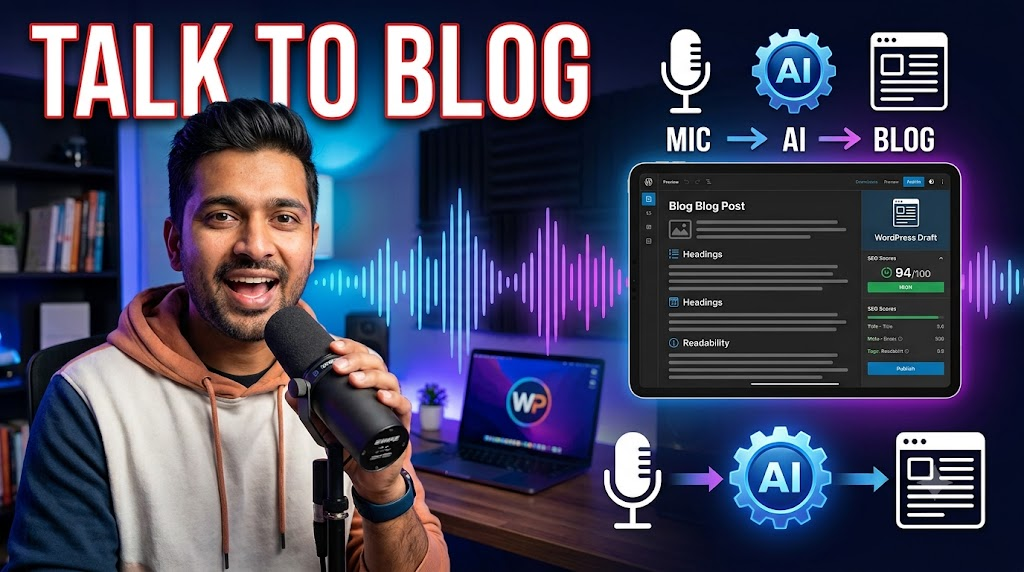
A Voice to Blog AI is a specialized content system that converts spoken words into fully structured, polished, and search-optimized articles. Unlike generic AI writing assistants that generate text from a short text prompt, a voice-first system requires your direct input as the core source of truth.
The system does not invent facts, fabricate stories, or pull random data points from the web. Instead, it serves as an intelligent editorial assistant. It listens to your raw, unedited audio or video files, understands the context of your speech, fixes grammatical mistakes, and organizes your thoughts into clean paragraphs with appropriate headings.
[User Thinking] ➔ [Voice Recording] ➔ [Speech Recognition] ➔ [Transcript Cleanup] ➔ [Formatting & SEO] ➔ [WordPress Draft]This workflow ensures that the final piece of content sounds like you, reflects your genuine expertise, and contains your exact insights. The technology acts as a bridge between your spoken thoughts and a production-ready web document.
[Insert Dashboard Screenshot Here]
Why People Use Voice to Blog AI
The main reason creators switch to a voice-first workflow is speed without sacrificing authenticity. Traditional automated content tools often produce generic, repetitive text that sounds like an encyclopedia. Audiences can spot this from a mile away, and search engines increasingly prioritize real, first-hand experience.
When you speak about a topic you know well, you naturally use real-world analogies, share personal observations, and explain concepts using a conversational tone. Capturing this raw speech prevents your content from feeling mechanical.
A realistic scenario: Imagine an affiliate marketer who just spent three days testing a new power tool. Instead of spending an entire evening drafting a review, they can turn on a microphone and explain their findings out loud while looking at the tool. A voice-centric platform turns that unstructured, messy audio stream into a highly scannable review complete with feature lists, pros, cons, and structured headings.
Additionally, this workflow opens up content creation to people who struggle with typing, deal with repetitive strain injuries (RSI), or are constantly on the move. You can dictate a complete guide while walking in a park or sitting in your car during a lunch break.
Key Features of a True Voice-to-Text Blogging Platform
To move beyond simple dictation software, a dedicated workflow requires specific, deeply integrated components built for web publishing.
1. Multi-Format Audio Processing
The system must handle more than just live microphone input. It should accept pre-recorded audio files (MP3, WAV, M4A) and video uploads. Advanced setups can pull directly from podcast feeds or YouTube links, allowing creators to repurpose old media into written long-form content.
2. Context-Aware Transcript Cleanup
When people speak, they repeat themselves, say “um” or “uh”, pause mid-sentence, and occasionally change directions entirely. Simple speech-to-text tools leave these artifacts in the text. A built-in cleanup engine filters out the noise while preserving the core arguments and nuances of the speaker.
3. Automatic Semantic Formatting
An unformatted 2,000-word wall of text is unreadable on modern screens. The platform automatically detects transitions in your speech to generate logical H2 and H3 headings, bullet points, numbered steps, and blockquotes for important takeaways.
4. Built-in SEO Optimization Toolkit
Writing for readers is priority number one, but search engines still need structural clues. The tool should analyze the spoken text to generate:
- Optimized meta titles and descriptions within safe character limits.
- Clean URL slugs.
- FAQ sections based on the naturally discussed points.
- JSON-LD Schema markup (such as HowTo or Article schema) to earn rich snippets.
5. Direct CMS Integration
Copying and pasting text between different tabs breaks your focus. Direct integration with platforms like the WordPress Gutenberg editor allows you to send cleaned drafts straight to your website backend with formatting, tags, and suggested categories intact.
[Insert Feature Screenshot Here]
How It Works: The Core Technical Philosophy
The engine behind this methodology relies on a multi-stage pipeline designed to ensure absolute data integrity. The goal is to maximize output quality while preventing the AI from hallucinating or inserting unverified information.
+---------------------+
| Raw Audio Input     |
+---------------------+
           |
           v
+---------------------+
| Speech-to-Text      | -> High-accuracy transcription (Whisper/Deepgram)
+---------------------+
           |
           v
+---------------------+
| Linguistic Cleanup  | -> Removes filler words, fixes syntax and grammar
+---------------------+
           |
           v
+---------------------+
| Structural Layout   | -> Maps text to Markdown (Headings, Lists, Tables)
+---------------------+
           |
           v
+---------------------+
| SEO Engine Injection| -> Creates Title, Meta, Slug, and Schema
+---------------------+
           |
           v
+---------------------+
| CMS Export Layer    | -> Pushes fully styled draft to WordPress API
+---------------------+- Speech Recognition Layer: The raw audio file passes through an advanced speech-to-text model (like OpenAI Whisper or Deepgram) to generate a raw text transcript with precise timestamps.
- Grammar and Readability Pass: The raw transcript enters a specialized layout engine. This component scans for run-on sentences, structural imbalances, and grammatical errors, fixing them without changing the semantic meaning of the text.
- SEO and Metadata Analysis: The structural engine looks at the core themes to suggest internal links, external reference points, and natural keyword placements based on your actual narrative.
- Publishing Hook: The finalized Markdown text converts into HTML or native Gutenberg blocks, which are pushed securely via an authenticated API directly to your blogging platform.
Practical Use Cases Across Industries
Different industries use voice-driven content creation to solve distinct operational bottlenecks.
Solo Bloggers & Niche Site Publishers
Managing multiple content sites requires a high volume of high-quality material. A solo blogger can record their thoughts on five different sub-topics in a single morning, running the files through the pipeline to build a week’s worth of draft articles in under an hour.
Digital Agencies & Content Teams
Agencies often interview client subject matter experts (SMEs) to get authoritative insights. Instead of paying a writer to manually listen to a one-hour interview tape and write a post from scratch, the agency can feed the raw interview audio into a Voice to Blog AI to generate a beautifully structured draft immediately.
Freelance Writers and Consultants
Consultants have vast amounts of knowledge but little time to write. By speaking into a portable recorder while going about their day, they can effortlessly maintain an active business blog, showcase their expertise, and attract new clients without sacrificing billable hours.
Step-by-Step Guide: Going from Voice to a Live Blog Post
Step 1: Prepare Your Notes
Spend two minutes jotting down a rough outline of what you want to cover. You do not need a script—just a few bullet points to ensure you hit all your main arguments.
Step 2: Record Your Audio
Open your platform’s recording interface or use a high-quality smartphone voice memo app. Speak clearly and naturally, as if you were explaining the topic to a colleague. Do not worry about mistakes; if you mess up a sentence, simply repeat it correctly and keep going.
Step 3: Run the Transformation Engine
Upload the audio file or stop the live recording. Select your desired target language, tone profile, and target length configuration. Click the process button to start the background transcription and optimization pipeline.
[Insert Results Screenshot Here]
Step 4: Review and Refine the Draft
Once the system outputs your structured draft, review it carefully. Check the automatically generated headings, read through any bullet points, and make sure any technical terms unique to your niche are spelled correctly.
Step 5: Export and Publish
Click the export button to send the article directly to your WordPress dashboard. Review the layout inside the block editor, attach your feature images, fill in any missing alt text, and hit publish.
Benefits of Using Voice to Blog AI
- Drastic Time Reductions: Translating thoughts into long-form written copy takes a fraction of the time compared to manual typing workflows.
- Preserves Originality: Because the core text originates directly from your spoken words, the content remains uniquely yours, helping you naturally satisfy search engine quality guidelines regarding original viewpoints.
- Eliminates Staring Blocks: Speaking bypasses the psychological friction of writing. It is much easier to edit a fully formed, structured draft than it is to write the first paragraph on an empty page.
- Clearer Structural Flow: Spoken language tends to follow a logical storytelling path, which translates into highly readable paragraphs and natural content transitions.
Limitations to Keep in Mind
While the technology is incredibly efficient, it is not a magic wand that works perfectly in every situation without human oversight.
- Technical Jargon Hurdles: If your industry uses obscure brand names, complex medical terminology, or specific programming syntax, the initial speech-to-text engine might mishear them. A software engineer dictating code architecture might find that “SaaS” gets transcribed as “sass” or “SQL” turns into “sequel.” You must double-check niche acronyms.
- Accent and Background Noise Interferences: Recording in a noisy coffee shop or using a low-grade built-in laptop microphone can introduce transcription errors. Clear audio input is vital for an accurate output.
- Requires Clear Pre-Thinking: If your recorded thoughts are completely disorganized and constantly contradict themselves, the formatting engine will struggle to build a coherent article structure. A basic mental outline remains a necessity.
Pros and Cons
| Pros | Cons |
|---|---|
| ✅ Content creation is 3 to 5 times faster. | ❌ Requires a clean microphone environment for best results. |
| ✅ Zero AI hallucinations; it only uses your ideas. | ❌ Can struggle with highly complex technical acronyms. |
| ✅ Generates complete SEO metadata and schema with one click. | ❌ Requires manual proofreading to check spelling of names. |
| ✅ Helps maintain a casual, engaging, and authoritative tone. | ❌ Requires clear speaking habits to avoid messy inputs. |
Comparing Content Creation Workflows
| Evaluation Metric | Traditional Manual Typing | Generic AI Prompt Tools | Voice to Blog AI Approach |
|---|---|---|---|
| Creation Speed | Slow (Several hours per post) | Fast (A few seconds) | Balanced & Fast (Minutes) |
| Authenticity | High (100% human thought) | Low (Generic web-scraped ideas) | High (100% user-driven ideas) |
| Fact Accuracy | Dependable (Verified by author) | Risky (Prone to fake facts) | Dependable (Only uses your data) |
| SEO Readiness | Manual structural setup | Requires complex prompting | Automated structural setup |
Best Alternatives for Content Creators
If you are looking to test out voice workflows, here is how the primary options on the market stack up:
1. The Multi-Tool Combo (Otter.ai / Descript + ChatGPT)
Many creators build their own setup using standard transcription tools coupled with a general LLM. You record your voice inside Otter or Descript, export the raw text transcript, and paste it into ChatGPT with a prompt like: “Clean this up, fix the grammar, and organize it into a blog post.”
- The Catch: This method requires manual back-and-forth copying, constant prompt tweaking, and lacks direct publishing connections to WordPress.
2. Basic Smartphone Dictation (Apple / Google Voice Typing)
You can open Google Docs or Microsoft Word on your computer, activate the built-in voice typing feature, and start talking.
- The Catch: These tools act purely as real-time keyboards. They do not remove your filler words, fix major structural issues, create headings, or handle SEO optimizations.
3. Dedicated Voice-First SaaS Solutions
Purpose-built tools designed specifically for bloggers combine transcription, linguistic editing, SEO formatting, and WordPress exporting into a streamlined workspace. They remove all workflow friction, allowing you to go from an audio file to an optimized web page using a unified dashboard.
Common Mistakes Users Make
- Treating it Like an Autonomous Writer: Some creators stop talking mid-thought, expecting the system to finish their ideas. Remember, the tool is a layout refiner and editor, not a substitute for your knowledge. If you leave out key steps, your article will have visible gaps.
- Ignoring the Importance of Audio Quality: Recording via speakerphone in a windy environment leads to broken transcripts. Investing in a modest USB microphone or using a dedicated lapel mic makes a massive difference in final draft quality.
- Over-Editing the Output: It is tempting to rewrite every sentence to make it sound formal. However, doing so often strips away the conversational tone that makes voice-driven writing engaging in the first place. Trust your natural spoken rhythm.
Frequently Asked Questions
1. Does Voice to Blog AI write things I didn’t say?
No. A properly configured system acts strictly as an editorial layout optimizer. It reorganizes your input text, irons out grammatical flaws, and formats paragraphs, but it does not invent new facts, statistics, or external stories.
2. Can I use audio files recorded on my phone?
Yes. You can record voice memos using standard mobile apps while walking or commuting, then upload those files directly to the platform for transcription and formatting later on.
3. How does this affect my site’s SEO?
It improves your SEO by helping you create highly detailed, first-hand informational content quickly. Because the text is based on your real spoken words, it naturally includes contextual variations and answers real user questions without keyword stuffing.
4. What happens if I make a mistake while speaking?
You can ignore minor stumbles. If you make a mistake, pause for a brief second and say the sentence again correctly. The underlying editing engine recognizes the repetition and automatically cuts out the incorrect attempt.
5. Does the software support languages other than English?
Most modern speech engines support dozens of major global languages and dialects. They can accurately process audio inputs in Spanish, French, German, Hindi, and more, outputting grammatically correct articles tailored to your audience.
6. Will search engines penalize this content?
Search engines look for original information, clear structure, and user value. Because the tool formats your personal insights and real experiences rather than generating automated generic summaries, the content stands up well to quality evaluations.
7. Do I still need to edit the final text?
Yes. You should always read through your drafts before publishing. While the formatting tool handles the heavy lifting, a brief human review ensures that specific names, locations, and unique product titles are formatted perfectly.
8. How long of an audio clip do I need to record?
A good rule of thumb is that 10 to 15 minutes of continuous speech generally translates into a comprehensive 1,500 to 2,000-word written article once properly structured.
9. Can it handle multi-person interviews or podcasts?
Yes. Advanced systems feature speaker diarization, allowing them to distinguish between different voices. This makes it easy to turn an interview or co-hosted podcast episode into an organized article with clear dialogue markers or subheaders.
10. Can I configure my specific brand tone?
Yes. Most advanced platforms allow you to set specific style rules, such as choosing between an approachable conversational tone or a formal, academic presentation format to match your existing site branding.
Final Thoughts
The shift toward a voice-driven workflow represents a major change in how we think about content creation. It removes the mechanical friction of typing, letting you focus entirely on your core ideas, experiences, and insights.
If you find yourself constantly staring at blank documents or falling behind on your editorial calendar because writing feels like a chore, exploring a Voice to Blog AI approach is a logical next step. It is an ideal solution for subject matter experts, busy business owners, and active marketers who want to scale their content production without losing their authentic personal voice.
On the other hand, if your work requires heavy software coding blocks, dense mathematical formulas, or meticulous line-by-line data inputs, traditional manual typing paired with an editor remains the safest bet. For everyone else, it is time to turn on the microphone and let your ideas speak for themselves.